
Agentic AI for Accounting Firms: How It Actually Changes the Month-End Close

Agentic AI for accounting firms has moved past the proof-of-concept stage, and the gap between firms that know that and firms still optimizing their prompts is about to become very concrete. A few years ago, the accounting world went all-in on prompt engineering. Firms ran workshops on it. Speakers built whole sessions around it. The idea was that if you could just write the perfect prompt, you'd finally get something useful out of AI. That framing is already out of date, and the firms that are still perfecting their prompts while their competitors are running autonomous month-end closes are going to feel that gap in a very real way.
The Prompt Engineering Era Is Already Over
The session I originally built this talk around was called Better Prompts, Better Results. I changed it. Not because the original material was wrong, but because it was already aging out from under me before I could deliver it.
Two years ago, that framing made sense. If you wanted a usable result from an AI model, you had to do real work up front. You'd specify who you were, what role you wanted the model to play, what context you were working in, exactly what format you wanted the output in, and what the input looked like. Skip any of those pieces, and you'd get something technically correct and practically useless. Prompt engineering was a real skill because the models needed all that scaffolding to function.
That's not really true anymore. The models have gotten smarter, and they've gotten better at inferring what you actually need. You'll see that play out in the demos below, where a four-word instruction produces a cleaned Excel file and a plain four-sentence prompt turns three bank statements into a comparative income statement, a cash position analysis, and a flagged anomaly report. No elaborate structure. No role assignment. No output-format specification.
Where prompts still matter most is in pure generative AI settings, the kind where you open a chat window, type a question, and wait for an answer. That's a one-shot interaction, so the quality of what you ask shapes the quality of what you get. But once you move past that model and into agentic workflows, the dynamic shifts completely. You define the workflow once, with the steps, the rules, the approval gates, and the output format, and the model repeats it exactly every time. The prompt becomes the workflow, and you only have to write it once.
That's the shift worth understanding here. Not how to phrase a better question, but how to stop asking questions and start assigning work.
— Stephen M. Yoss, CPA
What Agentic AI Actually Is (and Why It's Different)
Think about what you actually do with AI right now. You open a chat window, type a question, read the answer, and decide what to do with it. That's generative AI, and it's genuinely useful. But it's still just a very smart query engine. You're doing the work. The AI is answering questions while you drive.
Agentic AI flips that. Instead of answering your question and waiting, an agent takes a goal, figures out the steps required to reach it, executes those steps across whatever tools it needs, checks its own results, and keeps going until the job is done. Planning, acting, evaluating, repeating. That's the reasoning-action loop, and it's what people mean when they talk about AI 3.0, the shift from single-response AI to multi-step, multiple-app, goal-driven systems.
The technical piece that makes this possible is Anthropic's Model Context Protocol, or MCP (introduced by Anthropic in late 2024). It's the glue that lets applications actually talk to each other. Without it, you're stuck in the old cycle: export from QuickBooks, import to Excel, export from Excel, paste into Word. MCP lets Claude connect directly to QuickBooks, pull the data it needs, push results to a spreadsheet, and write a narrative in Word, without you touching the handoffs. Excel talking to QuickBooks talking to whatever else you've got. That's the infrastructure shift.
Here's the analogy that makes it click. Imagine a staff member walks into your office and says, "Hey, got anything for me today?" You hand them the task, tell them to flag anything they're unsure about, and go back to your own work. You don't stand over their shoulder. You don't manually move files between their desk and yours. You just get a result. That's what an agent does.
And here's why this matters specifically for accounting: most of what we do is high-volume, rules-based work. Bank reconciliations, transaction categorization, variance analysis, period-end close. That's not creative judgment work — it's pattern matching at scale. Agents were essentially built for this kind of task. The question isn't whether AI can handle it. It's whether you've set up the workflow to let it.

- You ask a question; it answers and stops
- Each session starts from scratch — no memory of prior work
- You move the outputs manually between tools
- Prompt quality drives result quality
- Best described as an enhanced search and drafting tool
- You set a goal; it plans, acts, checks results, and repeats
- Skills and workflows persist — the process runs the same way every time
- MCP connects applications directly, no manual export/import
- The workflow drives result quality; prompts matter far less
- Acts like a virtual staff member working through a task list
Demo 1: Data Cleanup in Minutes (Not Hours)
Here's the actual prompt: Clean up the data in this file. Make sure the dates and descriptions are consistent. Return the clean data to an Excel worksheet. That's it. No role assignment, no output format specification, no context scaffolding. Three sentences and a file attachment.
The data itself was a mess: inconsistent date formats, descriptions that varied in capitalization and phrasing, the kind of thing that would take a junior staff member a solid chunk of an afternoon to work through manually. Eighteen records in this case, which doesn't sound like much until you ask yourself what happens when it's 5,000. The answer is that the prompt doesn't change. The time you spend doesn't change either. You paste the file, type the same three sentences, and go back to whatever you were actually working on.
One deliberate choice worth noting: the model running this was Claude Sonnet, not Opus. Opus is the higher-capability, higher-cost tier. If Sonnet handles the task accurately, and it did, there's no reason to pay for the tier above it. Matching model to task isn't a minor optimization; it's how token costs stay manageable as you scale across dozens of workflows. You'd make the same call with staffing: don't send a senior partner to do something a capable associate handles fine.
The result came back before the next slide loaded. Dates normalized to a consistent format. Descriptions standardized. The output landed in a clean Excel worksheet, ready to use. Nothing crashed, nothing needed a second pass, and the whole exercise took less time than it would have taken to explain the task to a human.
That's the argument in miniature. The cognitive overhead of issuing the instruction is nearly zero. The time savings on 18 records is modest. On 5,000 records, it's the difference between a half-day task and a five-minute handoff, and the accountant's involvement is identical either way.
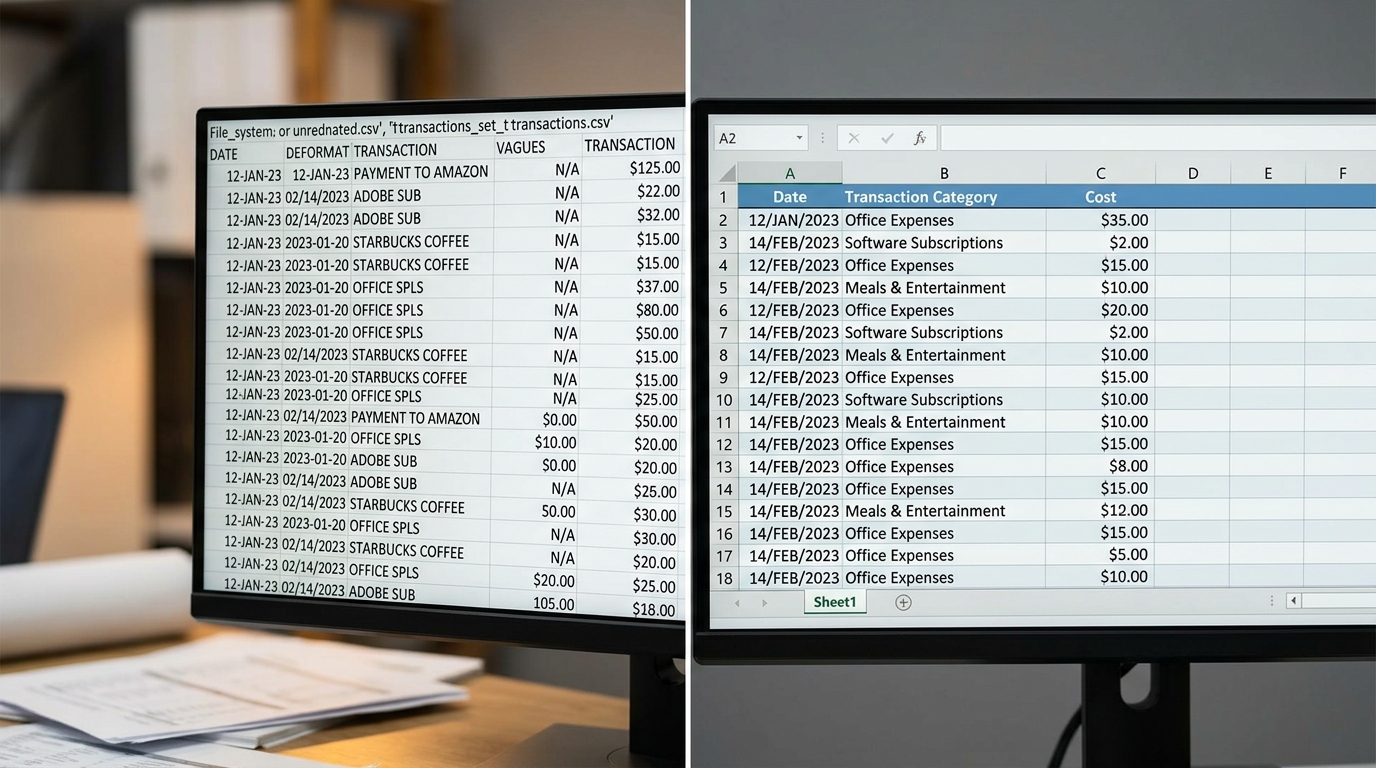
What the Cleanup Actually Looked Like
- Paste the raw file into Claude (Sonnet tier) with no additional context or role setup.
- Type the prompt
Clean up the data in this file. Make sure the dates and descriptions are consistent. Return the clean data to an Excel worksheet.
- Claude normalizes all date entries to a consistent format and standardizes description text across every row.
- The cleaned data comes back as a downloadable Excel file — open it, confirm it looks right, and it's done.
Demo 2: Income Statement from Bank Statements (and What the Agent Did When It Hit a Wall)
Picture this client: small electrical contractor, growing faster than expected, needs a loan, walks in and says he's never kept a set of books. He's got a business bank account and a business credit card, and every transaction ran through one of those two. That's it. No QuickBooks, no chart of accounts, no reconciled ledger. Just three months of bank statements.
The prompt I gave Claude was four instructions. Create an income statement or balance sheet from these statements. Write a summary narrative over the three-month period. Identify anomalies or unusual items. Ask me if you're unsure about anything. That's the whole thing. No role assignment, no output format specification, nothing engineered about it.
Here's where it got interesting. In my haste uploading the files, I accidentally named two of them May and then renamed one March. So I handed Claude two identical May statements and called one of them March. Claude caught it immediately. Before running a single calculation, it came back and said the file labeled March contained duplicate May data: identical transactions, identical balances, all dated 05/01 to 05/31. It told me it only had real data for April and May, that March was missing, and it would wait for the correct file before building anything.
That's not a search result. That's judgment. It refused to produce garbage output from bad input, which is exactly what a good staff member would do.
After I found the real March file and uploaded it, Claude confirmed that beginning and ending balances tied across all three statements, its exact phrasing, accounting language you'd use yourself. Then it hit a real wall and said so plainly: bank statements only show the cash account. A full balance sheet requires fixed assets, vehicle loan outstanding balances, accounts receivable, accounts payable, and owner's equity, none of which appear in a bank statement. The Ford Credit loan payment shows up, but not the balance owed. It asked whether I wanted a cash-account-only analysis instead.
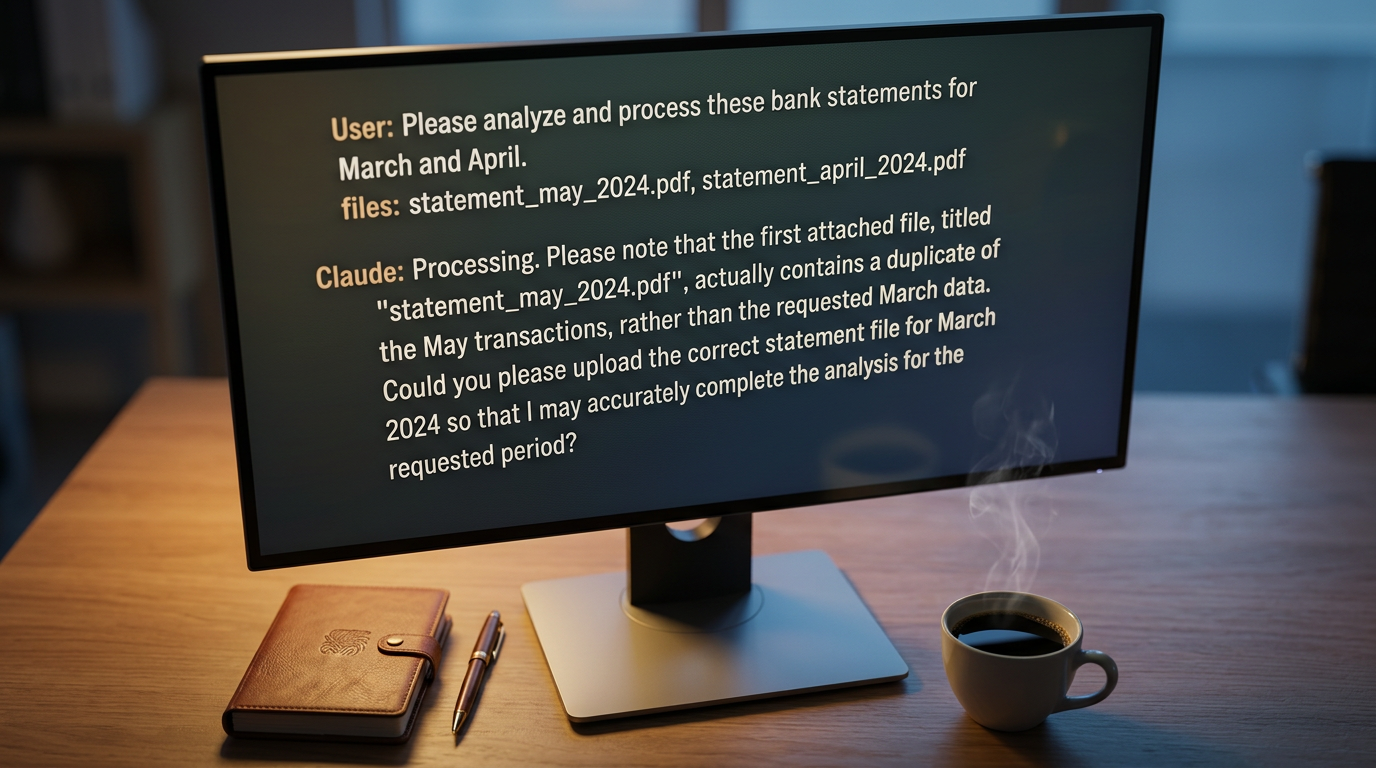
What Claude Actually Produced
- A comparative income statement across March, April, and May, with line-item detail pulled from transaction descriptions in the bank statements.
- A cash position statement showing month-by-month cash flow, with beginning and ending balances that tied exactly.
- A flagged anomaly
an unreferenced cash deposit of $303.94 on 03/13 with no apparent source.
- A flagged vendor concentration
Multiple payments to a single Springfield branch across April, clustered in a way Claude flagged as potentially consistent with splitting transactions to stay under a project spending limit — noted as a pattern worth verifying, not a confirmed finding.
- A note on the Ford Credit payment
the monthly amount combines principal and interest, so the loan balance itself isn't visible from the bank statement alone.
- A written performance narrative covering the full three-month period, including the May revenue drop and its implications.
What the Expense Review Actually Produced
- Key metrics summary: total spend, total transaction count, and average spend per transaction across the full data set.
- Employee totals by month and by spend category — the accumulation the prompt asked for, organized both ways.
- Category trend by month, showing how each spend category moved across the period.
- Anomaly: transactions dated before employee hire date
Severity: high. Twenty-six transactions flagged across four employees, listed individually with dates, amounts, and employee names.
- Anomaly: single meal entertainment charges near $2,000
Sixty transactions flagged. Claude produced a ranked list of the top twenty highest single-meal charges, all over $1,900, sorted by amount.
- All anomalies categorized by risk level — not just listed, but ranked — so the reviewer knows where to look first.
Demo 3: Expense Review — Anomalies Your Staff Would Have Missed
The prompt for this one was four instructions, same as the bank statement demo. Please analyze the file and accumulate expenses by employee name. Review the month-to-month spend by employee in total and within category. Identify any anomalies or issues in the data. Ask me if you're unsure about the task or process. That's it. No role assignment, no output format specification, no elaborate structure.
This one took about forty minutes to run, but I was working on something else while it did. That's the point. You hand it the file, type four sentences, and go back to your day. When it's done, it tells you. Think of it the same way you'd think of sending a junior staff member off to do a task: you don't stand over their shoulder for forty minutes. You just wait for them to come back.
What it came back with was not a summary. It was a full breakdown: total spend, transaction count, average per transaction, employee totals by month, employee spend by category, category trends over time, and a ranked anomaly list with severity levels. The kind of analysis that, done manually, would eat most of a day.
Two findings stand out. First: transactions dated before the employee's hire date. Severity high. Twenty-six transactions across four employees. Claude flagged every one of them, listed them out, and ranked them. That's not a rounding error — that's either a data problem or a fraud indicator, and it's exactly the kind of thing that gets missed when a human is grinding through a spreadsheet row by row at the end of a long week.
Second: single meal entertainment charges approaching $2,000. Sixty transactions flagged. Claude pulled the top twenty highest single-meal charges, all over $1,900, and listed them separately. Ranked by amount, categorized by risk level, ready to hand to a reviewer.
The prompt didn't change between 60 transactions and 26 transactions and 4 employees. It doesn't matter how big the file is. You type the same four sentences either way.
It refused to produce garbage output from bad input, and then told you exactly what it needed to do the job right.
— Stephen M. Yoss, CPA
How Claude Skills Turn a Workflow Into Repeatable Infrastructure
Think about what it would actually take to write a prompt detailed enough to run a real month-end close. Not a demo close, a real one, with QuickBooks connected, payment processor settlements pulled, duplicates flagged, and a P&L narrative drafted before you've touched the keyboard. You'd need a paragraph that covers every step, every rule, every approval gate, and every failure condition. Then you'd need to write it again next month. And the month after that.
That's the problem skills solve. A Claude skill isn't a saved prompt. It's a full workflow document that lives in a folder and contains everything Claude needs to run the process from start to finish: the trigger that starts it, the objective it's working toward, the ordered steps, the rules it has to follow, and the exact format the output should take. The difference between a saved prompt and a skill is the difference between a sticky note and a standard operating procedure.
The month-end close skill is the clearest example of what that looks like in practice. It doesn't just say 'reconcile the books.' It tells Claude to pull all QuickBooks transactions for the target month, pull settlements from every connected payment processor for the same period, match them, and then flag three specific types of gaps: unmatched QuickBooks deposits, unmatched processor deposits, and variance lines. From there, it detects suspicious duplicates, writes the P&L narrative to a defined format, and exports the close packet to the owner's drive.
The approval gates built into that skill are non-negotiable. Claude never auto-fixes a flagged item. It shows you the gap, tells you the recommended action, and waits. It never deletes a duplicate without your explicit confirmation. And it will not run a reconciliation on a month that has already been filed; it checks that the books are still open before it pulls a single transaction. Those aren't suggestions. They're hard stops baked into the workflow itself.
Here's the practical part: you don't write any of that from scratch. You run the workflow once, let Claude work through it, and then you ask Claude to build the skill from what it just did. It writes the skill for you. You name it, and it's available every time you need it from that point forward.
Among the accounting professionals I work with, Claude has become the default tool for this kind of workflow-level implementation, not a curiosity, but infrastructure. That's the framing worth carrying into your own firm's AI stack.

How the Month-End Close Skill Actually Runs
- Step 1: Claude asks you to confirm the target month before touching anything — it won't assume.
- Step 2: It pulls QuickBooks transactions and payment processor settlements for that month simultaneously.
- Step 3: It matches the two data sets and flags unmatched QB deposits, unmatched processor deposits, and any variance lines as three separate gap categories.
- Step 4: It scans for suspicious duplicates and surfaces them for your review — no deletions without explicit confirmation.
- Step 5: It pauses for owner sign-off on uncategorized transactions and settlement discrepancies before producing any output.
- Step 6: It writes the P&L narrative — headline, revenue, growth, anomalies — to the format defined in the skill.
- Step 7: It exports the close packet and confirms delivery. If any connector (QuickBooks, PayPal, or otherwise) failed during the run, it tells you that too.
AI Experimenter vs. AI-Powered Firm: The Real Competitive Gap
- Opens ChatGPT or Claude occasionally to draft an email or summarize a document
- No repeatable workflow — every session starts from scratch
- Core finance processes haven't changed at all
- Skeptical of outputs, rarely acts on them without heavy manual review
- Treats AI as a curiosity, not infrastructure
- Still spending three days on close and two days on the board deck
- AI embedded in repeatable monthly workflows — it's not optional, it's expected
- Staff review AI's first drafts rather than producing them from scratch
- Close commentary takes minutes, not days
- Board narrative is reviewed by the CFO, not written by them
- The CFO's time goes to judgment calls, not sentence construction
- Could run a QuickBooks-connected close in the background in roughly half an hour

What That Gap Looks Like in Practice
The experimenter isn't doing anything wrong, exactly. They're just stopped at the first exit ramp. They got curious, tried a few things, and kept the rest of their workflow exactly as it was. The AI-powered firm took the next step: they put agentic AI for accounting firms to work on the tasks that repeat every month and built a process around it.
Think about what that does to your staff. Right now, your junior accountants are doing the grunt work, pulling transactions, formatting reports, chasing numbers across spreadsheets. That's the work that burns people out and sends them looking for the door. Flip that around. Let AI do the grunt work and put your staff in the reviewer seat. They're checking what AI produced, applying judgment, asking whether the numbers make sense. That's a better job. It's also a more valuable one, because it keeps them in contact with clients rather than buried in a keyboard.
That client contact is where the real payoff shows up. Picture your client at a chamber of commerce luncheon, sitting next to a business owner who's complaining that it takes two weeks to get financials from their accountant. Your client says, that's odd — mine turns it around in a day. That's not a sales pitch. That's just what happens when AI is doing the first pass on the close and your staff is reviewing rather than building.
Senator Everett Dirksen of Illinois had a line he used in the 1960s about federal spending: a million here, a million there, and pretty soon you're talking real money. The same math applies here. Ten minutes saved on a reconciliation, ten minutes saved on a narrative, ten minutes saved on a variance flag: across a month, across a year, across a full client roster, that's not a rounding error. It's a force multiplier. More work gets done in the same time, by the same people, without adding headcount.
The experimenter is still waiting to feel confident enough to commit. The AI-powered firm already built the workflow and is compounding the savings every single month.
— Stephen M. Yoss, CPA
You're Still Accountable — Every Single Time
Lawyers have already tested this argument in court. In the Mata v. Avianca case (SDNY, 2023), attorneys who submitted AI-fabricated citations were sanctioned by the court. That happened in a profession where the standard of care is already extremely high. Accounting isn't different. If Claude produces a financial statement with a misclassified expense and you sign off on it, you signed off on it. The output belongs to you.
That's not a reason to avoid these tools. It's a reason to build your review process before you need it, not after something goes wrong. The same discipline applies to protecting your firm's data. If you're not sure how your AI tools handle client information, that's a gap worth closing. The cyber security CPE requirements for CPAs cover exactly this kind of exposure, and it's worth knowing where your firm stands.
In the early months of using any automated workflow, tie every report back to the source. If Claude produces an income statement from QuickBooks transactions, pull the ledger and confirm the numbers match. If it writes a narrative summary, check that the narrative matches the figures. Do that consistently until you've seen enough cycles to trust the output. You're not auditing Claude forever. You're building confidence through repetition, the same way you'd verify any new staff member's work before you stopped checking it closely.
The other non-negotiable: the person running AI inside your firm has to be a subject-matter expert. That's not a credential requirement, it's a functional one. If your staff member can't look at Claude's income statement and tell whether the gross margin makes sense for that client's industry, they can't catch the error. They'll review it, see numbers in the right cells, and approve it. That's not a review. That's a rubber stamp with extra steps.
Junior staff learning AI workflows is genuinely valuable, and the earlier you start that onboarding the better. But the judgment layer, the person who decides whether what Claude produced is correct, has to know the subject well enough to argue with the output when it's wrong.
The Three-Step Check Before You Sign Off
- Generate the workLet Claude complete the task — the reconciliation, the narrative, the financial statement, whatever the workflow produced. Don't intervene mid-process. Let it finish and give you the full output before you start reviewing.
- Vet the sourcesTrace the numbers back to their origin. If the report says $86,000 in customer collections, find those transactions in the ledger or the bank statement. If Claude flagged an anomaly, confirm the underlying transaction actually exists and looks the way Claude described it. A confident-sounding output is not the same as a correct one.
- Find the logic gapsAsk whether the output makes sense given what you know about the client. A payroll figure that's 63% of operating costs might be right for a labor-intensive contractor and alarming for a software reseller. Claude doesn't know which one your client is — you do. This is the step that requires subject-matter expertise, and it's the step that can't be automated.
Where to Start: Putting Agentic AI to Work in Your Firm
Whatever your biggest headache is right now, the one that eats your Tuesday and bleeds into Wednesday, that's your starting point. Not the most interesting workflow, not the one that will impress a client. The one that hurts. That's where you'll see the return fastest, and that's where you'll build the confidence to keep going.
The pattern in every demo above is the same: pick a real, recurring task, hand it to Claude with a plain-language description, and let it run. Data cleanup. Bank reconciliations. Financial statement prep from whatever the client actually has. Expense reviews. Revenue forecasting. These aren't exotic use cases; they're the work your staff is grinding through every month right now. The difference is that an agent doesn't need the task to be interesting to do it well, and it doesn't burn out on transaction 4,000.
Think about where a controller actually spends their month: narrative writing, reconciliations, variance hunting, data gathering and formatting, journal entries and adjustments. Most of that is exactly the kind of high-volume, rules-based work that agents handle well. When AI handles the first pass on those tasks, the hours come back fast.
The onboarding implication is worth taking seriously. Your junior staff coming in today probably already use AI more fluently than your senior team does; they've been doing it for school assignments for years. So stop onboarding them into data-entry workflows that AI handles better anyway. Teach them to build skills, review agent outputs, and apply professional judgment to what the model produces. That's a more valuable skill set, and it's a better job. They're less likely to leave.
On the cost side, track the ROI in terms that actually mean something to your firm: hours recovered per month-end close, errors caught before they reach a client deliverable, how many new clients you added without adding headcount, and whether your staff retention numbers are moving. Those four numbers tell the story. If you can't point to movement in at least two of them after ninety days, you haven't moved past the experiment stage yet.
The goal isn't to subscribe to every AI platform that sends you a demo request. It's to standardize the workflows that repeat, the ones where consistency matters and variance costs you, and preserve flexibility everywhere else. Pick the tool that fits those workflows, build the skills around them, and let that be the infrastructure. You don't need ten tools. You need the right ones, running reliably, every month.
Your First 90 Days: A Practical Starting Sequence
- ☐ Identify your single most painful recurring task — the one that takes the most staff hours for the least advisory value. Start there, not with a pilot program.
- ☐ Run it once manually while Claude watches, then ask Claude to build a skill from the workflow it just observed. You don't write the skill from scratch.
- ☐ Expand to a second repeatable workflow only after the first one has run cleanly for at least two full cycles. Reconciliations, expense reviews, and financial statement prep are the natural next steps.
- ☐ Revise your junior staff onboarding to include AI skill-building from day one. Prompt fluency and output review are the job now — not formatting spreadsheets.
- ☐ Measure four things every month: hours recovered, errors caught early, client register size at current headcount, and staff turnover. If the numbers aren't moving, the workflow isn't embedded yet.
- ☐ Standardize on the tools that fit your repeatable workflows. Avoid tool sprawl — every platform you add is a training burden, a security surface, and a governance gap.
Frequently Asked Questions About Agentic AI for Accounting Firms
What's the difference between generative AI and agentic AI for accounting work?
Generative AI answers a question and stops. You ask, it responds, and then you decide what to do with the answer. Agentic AI takes a goal, figures out the steps to reach it, executes those steps across whatever tools it needs, checks its own results, and keeps going until the work is done. In accounting terms: generative AI tells you what the variance is; agentic AI pulls the QuickBooks transactions, matches them against the payment processor settlements, flags the gaps, drafts the P&L narrative, and waits for your sign-off before it finalizes anything.
Do I need to be an expert at writing prompts to use agentic AI effectively?
No — and that's one of the central points of this approach. The demos in this article used prompts of three or four plain sentences, not engineered paragraphs. Once you move to agentic workflows and build Claude skills, you define the detailed instructions once inside the skill document. After that, you trigger the workflow with a short request and the skill carries all the complexity. Prompt engineering matters most when you're querying a generative AI model with no saved context. In an agentic setup, the model already knows the rules.
How do I build a Claude skill for my month-end close?
Run the workflow manually with Claude first — walk through the actual steps: pull QuickBooks transactions, pull payment processor settlements, match them, flag gaps, detect suspicious duplicates, draft the P&L narrative. When it's done, ask Claude to build a skill from the workflow it just completed. It will produce a structured document with the trigger, objective, ordered steps, rules, approval gates, and output format. You name it, save it to a folder, and it's available every month from that point forward. You don't write the skill document from scratch.
Can Claude really build a financial statement from bank statements alone, without QuickBooks?
It can build an income statement and a cash position analysis from bank statements, and it will do so accurately — including catching duplicate files, flagging anomalies, and writing a performance narrative. What it can't do, and will tell you directly, is build a complete balance sheet from bank statements alone. A real balance sheet needs fixed assets, vehicle loan balances, accounts receivable and payable, and owner's equity — none of which appear in a bank statement. Claude will identify exactly what's missing and ask for it rather than producing something incomplete without telling you.
Am I still legally and professionally responsible for AI-generated financial reports?
Yes, fully. In the Mata v. Avianca case (SDNY, 2023), attorneys who submitted AI-fabricated citations were sanctioned by the court. Accounting isn't different. If Claude produces a financial statement with a misclassified expense and you sign off on it, you signed off on it. The practical response is to build your review process before you need it: tie every automated report back to the source ledger, require a named human to sign off on every automated entry or disclosure, and make sure anyone using AI in your firm is a subject-matter expert who can judge whether the output is correct.
Test Your Understanding: Agentic AI in the Month-End Close
In the month-end close skill described in this article, what must happen before Claude finalizes any flagged items or discrepancies?